
Learn how the blog and other services running under subdomains of bergw.xyz are set up.
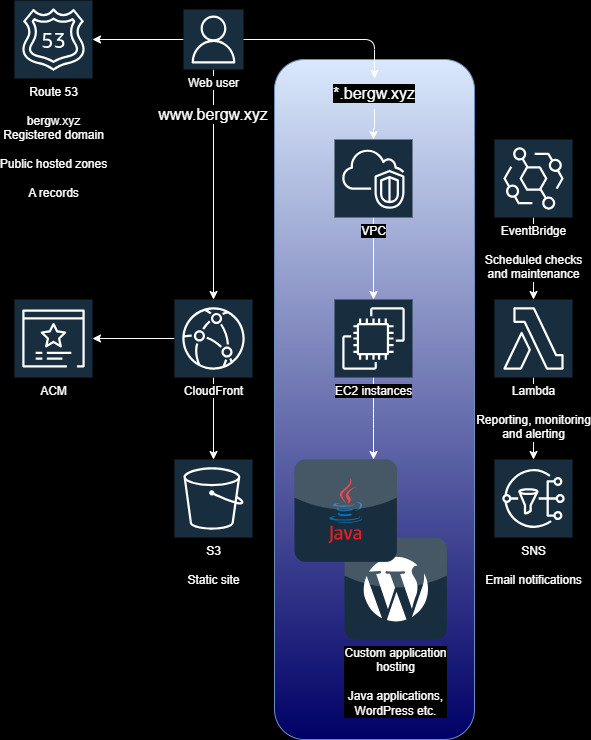
Single EC2 instances
EC2 instances with public IP addresses are not typically the best infrastructure choice for your production services:
- No scaling, so high traffic slows down the service and low traffic leaves it overprovisioned.
- A single instance outage will topple your service.
- Even an expected outage like a scheduled restart will unavoidably require service downtime.
However, single small instances are, in general, a great choice for developing and testing applications. For one thing, permissions for integration with other AWS services are managed under an assigned IAM role, which can then be used directly without modification in a productionised service. I would advise not trying to identify minimal permissions with reference to the AWS documentation alone — the cheapest way to test them is to run your service with them on an EC2 instance.
blog.bergw.xyz
This blog runs on self-hosted WordPress, on a single on-demand t2.micro EC2 instance with a public IP address.
The instance and its IP cost about $10/mo. There are certainly cheaper ways to run a WordPress blog, which also happen to be scalable:
- The WordPress.com managed service with a custom domain. £8 a month.
- An ECS cluster running the official WordPress image maintained by Docker. I would lose my nice VM that I can log into with Session Manager in the web console and tinker with whenever I like, but it answers any scalability need. Only a few dollars a month, and ECS scales closely with demand with almost no overhead.
However, a single EC2 instance provides an always-on VM, a static Linux environment that acts as a test bed for any application I need, that allows me full access to the file system and database without needing to manage container orchestration. WordPress is a PHP application served from a web server, so testing alternatives like static site generation, or hand-coded web pages like on the main site, is as easy as adding it to the filesystem, like this!
Scaling
Incidentally, since blog posts are mostly static content, it is possible to scale this blog in place by adding CloudFront as a content cache. An EC2 instance cannot directly be selected as a CloudFront origin, but API Gateway can be configured as an intermediate service. The latency and monetary costs are marginal, adding less than a dollar a month to the bill.
If you’re interested in the load testing I did to roughly determine if and when scaling is needed, check out the ‘back of a napkin’ load testing blog post.
bergw.xyz
The base domain routes to another EC2 instance, this one running a Spring Boot application that I recently uploaded the source of to GitHub. As the name implies, jsaveload-s3 is a Java application for uploading and downloading files to and from an S3 bucket in my AWS account. In keeping with security best practices, the IAM role for the EC2 instance only permits upload and download from one S3 bucket.
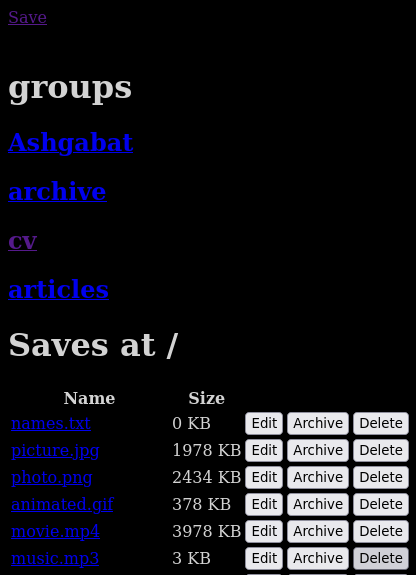
The web root issues convenience 301 Moved Permanently redirects for a few endpoints, including for the website root, so that going to bergw.xyz takes your browser to www.bergw.xyz. Besides being good for SEO, I feel it would just be rude not to.
Leave a Reply